Transcript
This 10-second clip has no sound. What you see:
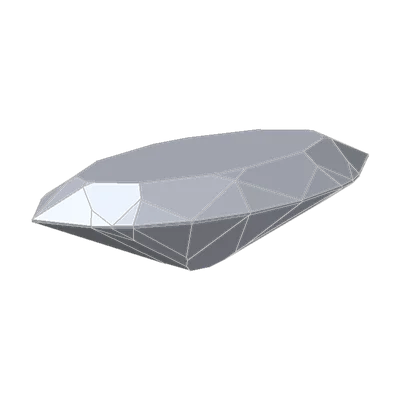
DG-Bowtie face up, turning under Home lighting: the band turns with the stone.
Two marquises, one dark bar
Here are two marquise diamonds, 1.00 ct each, D, Flawless, face up in the same room.
They have the same outline, 2.06 times as long as wide. They have the same 87 facets, at the same positions around the stone. The one on the left has a dark bar across its middle. The one on the right doesn't.
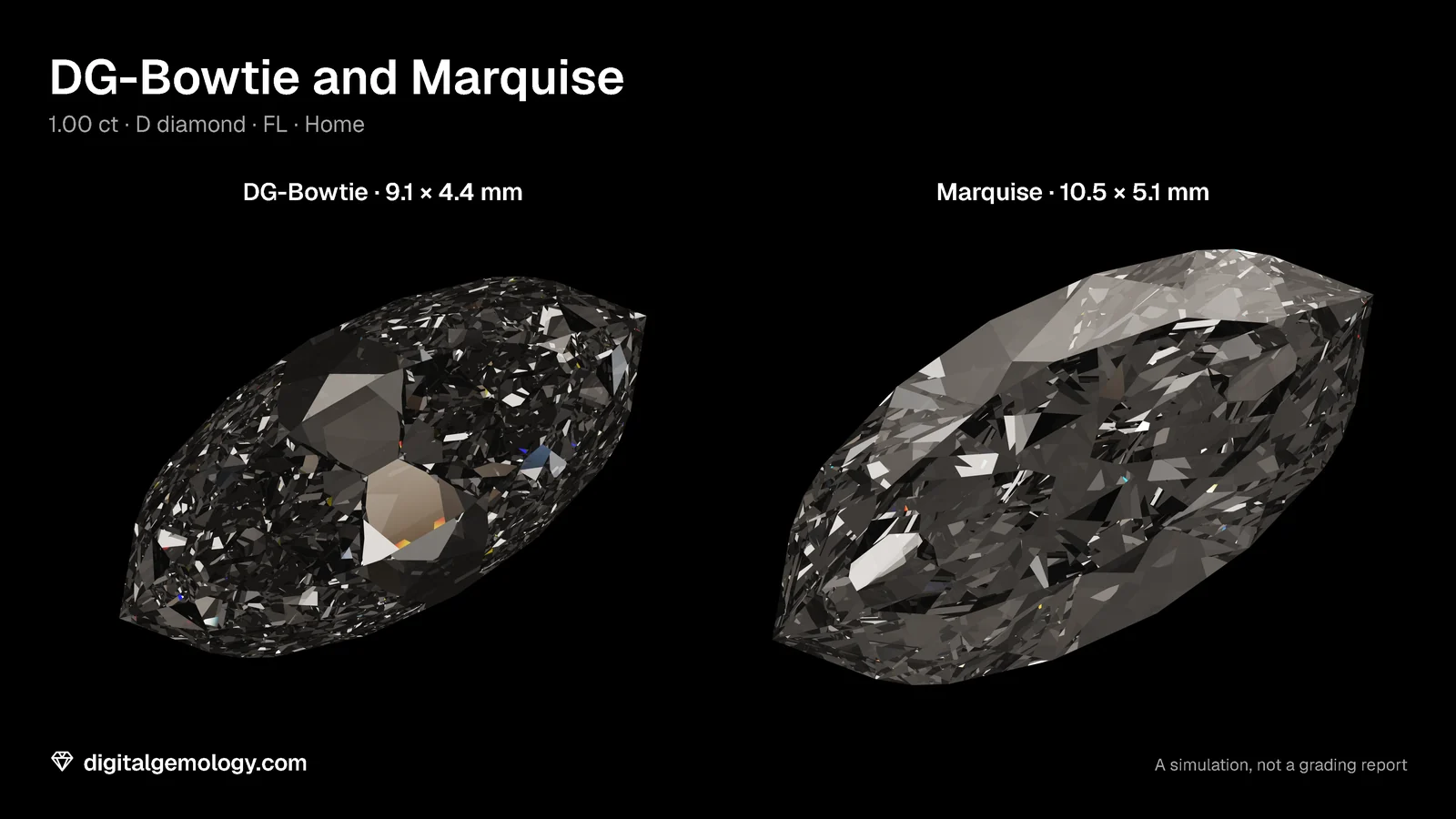
That dark bar is a bow-tie. The stone on the left is DG-Bowtie, the first marquise in our library. When we remodeled the Marquise, we kept the original under its own name, because it shows a bow-tie so clearly. The stone on the right is the remodel.
All our bow-tie pages work on that pair. Fixing a bow-tie shows exactly what we changed, and what it cost. (You may also notice that the Marquise looks bigger at the same weight. Why bow-ties are still cut explains it.)
The parts of an elongated stone
To talk about a bow-tie, you need three words. GIA's oval guide uses them, so with them you can read any article on bow-ties:
- Head or end: each end of the stone. On a marquise, the ends are points.
- Shoulder: where the outline curves away from the end.
- Belly: the wide middle.
A bow-tie is a dark band across the belly, from one side to the other. It's pinched in the middle. So it looks like two dark wedges that meet at the center, like a bow tie.
Watch the stone turn in the video at the top of this page. The band goes with it. It isn't a reflection of something in the room. It belongs to the stone.
What a bow-tie isn't
It isn't an inclusion, a color, dirt or the setting. Every source we read treats it as an effect of light and cut. Our stone proves it: DG-Bowtie is set to D, Flawless, with nothing inside it at all. The band is still there.
So where does a dark area in a flawless, colorless diamond come from?
Why a facet goes dark
A diamond makes no light of its own. It only redirects light that arrives from somewhere else. Each facet you see face up is a small window. Behind it, light bounces through the stone and either comes back to your eye from somewhere bright, or it doesn't.
The angle of the facet decides which way each window "looks". That's geometry. It doesn't change in a drawer, in a safe or on your hand.
So a bow-tie is a group of facets across the belly that send no light back to your eye, at the angles they have. Those angles were set when the stone was cut.
Our instrument: the light map
To see where each facet's light comes from, we use the simulator's Light map. It traces the stone face up. It colors every point by the direction its light came from, measured as a height above the girdle:
- Red, direct: from 45° to 75° up. The bright light from above.
- Green, indirect: from below 45°. Low, softer light.
- Blue, contrast: from 75° up to straight overhead, within 15° of your line of sight. That's where your own head is.
- Black, leakage: light that never comes back up to you. It leaves through the back of the stone, comes from below the horizon, or is still bouncing after 18 reflections.
The map uses the stone's geometry alone. No lighting scene and no color enter it. The AGS's ASET maps work on the same idea, and GIA now issues them. They show leakage in gray. Ours shows it in black.
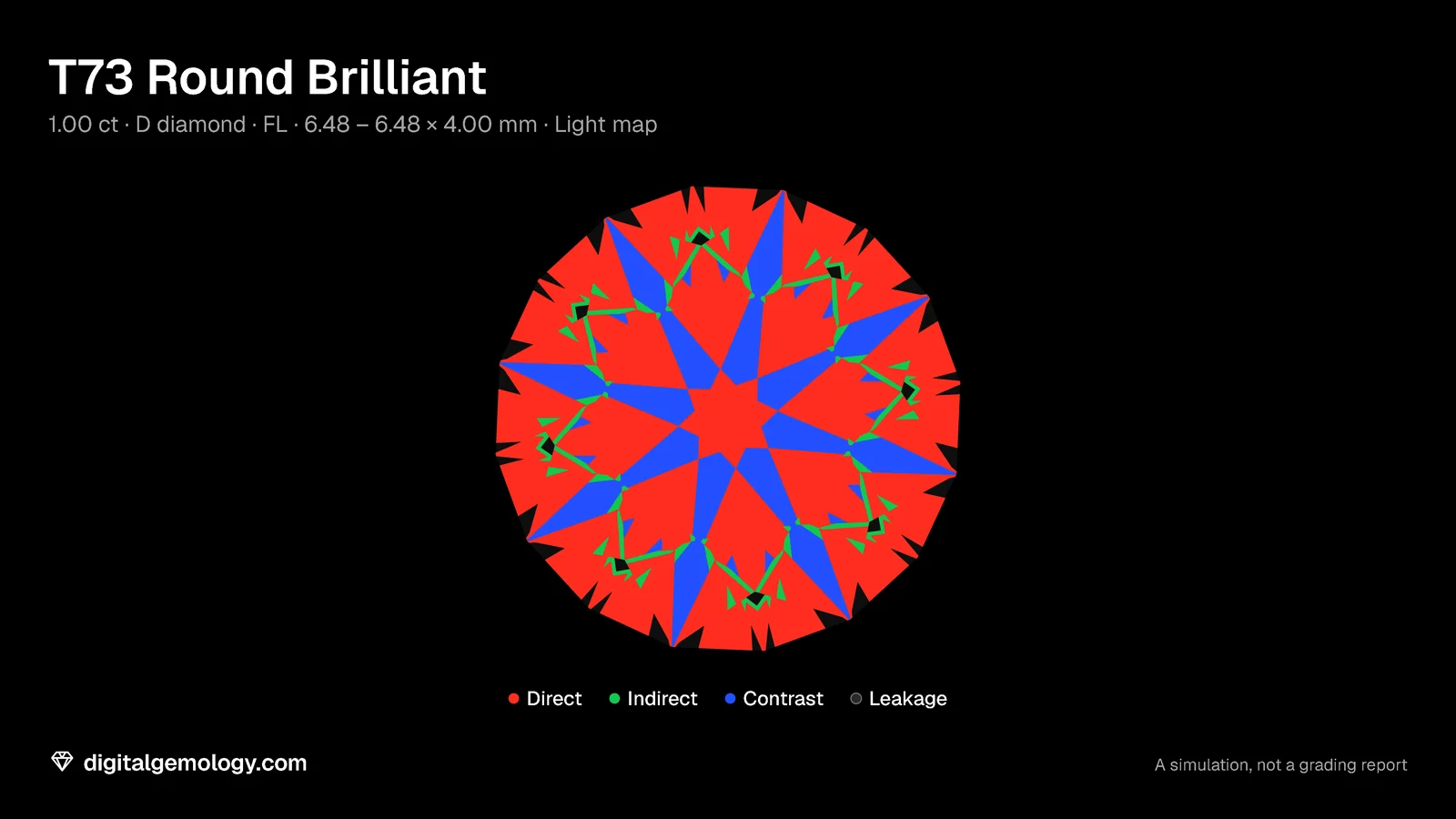
Learn the colors on a round first. The T73 is orderly: Light Return 69% direct, 5% indirect, 22% contrast and only 4% leakage.
Try it yourself
- Open 3D Gemstone Simulator with DG-Bowtie in diamond. Set the lighting to Home and the view to Face up. Find the band and the belly.
- Switch the cut to Marquise. Change nothing else.
- Switch the cut to the T73. Turn on Light map and read the Light Return bar.
- Switch the cut back to DG-Bowtie, with the light map still on.
- The challenge: before you read the bar, guess which color fills DG-Bowtie's band, and what share of the stone it covers. Then check. Last of all, look at the Marquise.
What the light map shows
DG-Bowtie's band is black. Its Light Return reads 15% direct, 21% indirect, 5% contrast and 59% leakage. More than half of what you see face up sends no light back to you. The biggest black area is the belly: the two wedges of the bow-tie. The rest lies scattered toward the points.
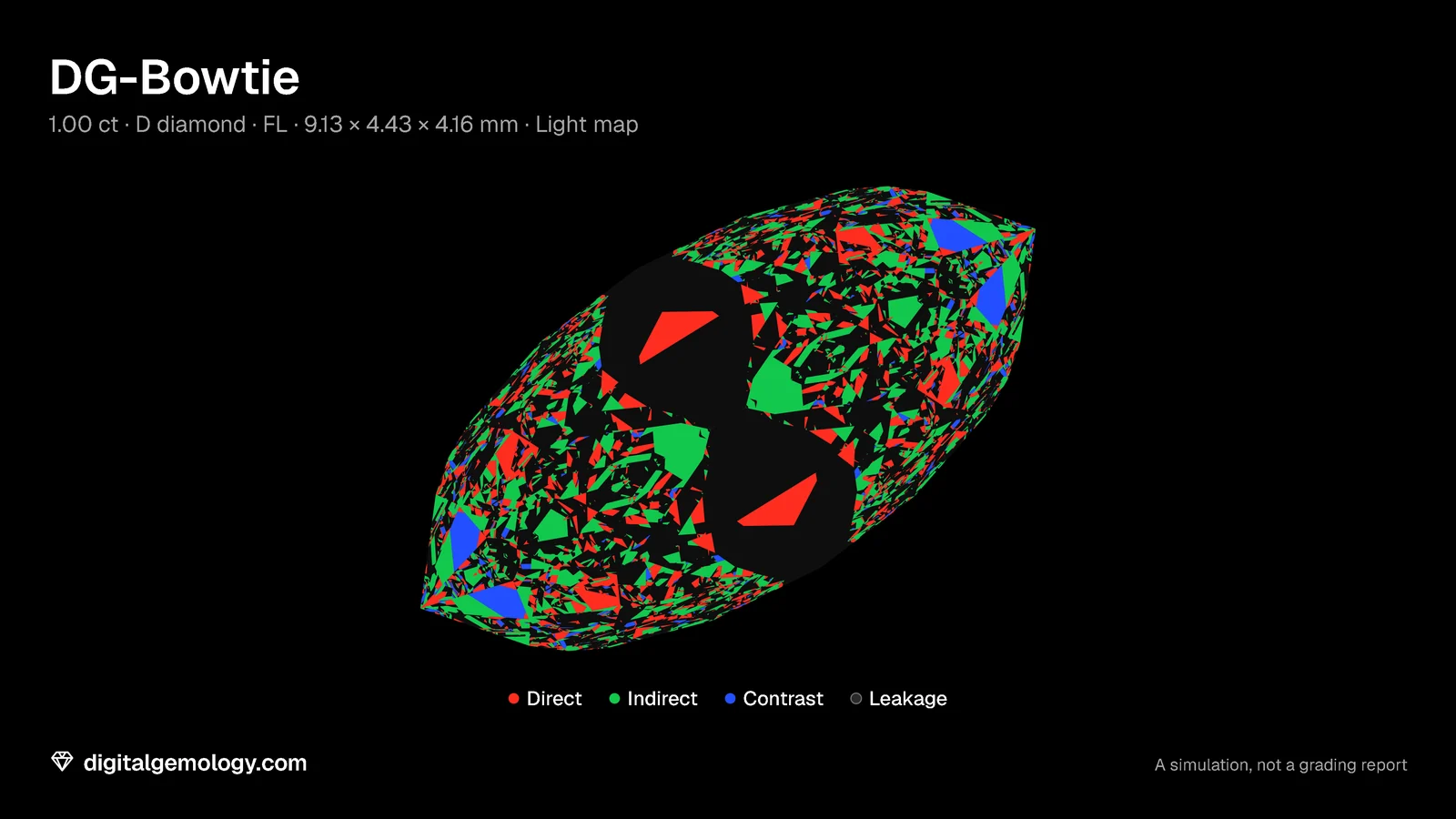
The Marquise reads 47% direct, 22% indirect, 6% contrast and 25% leakage. Its belly is the reddest part of the stone. The outline and the facets are the same: only the angles changed.
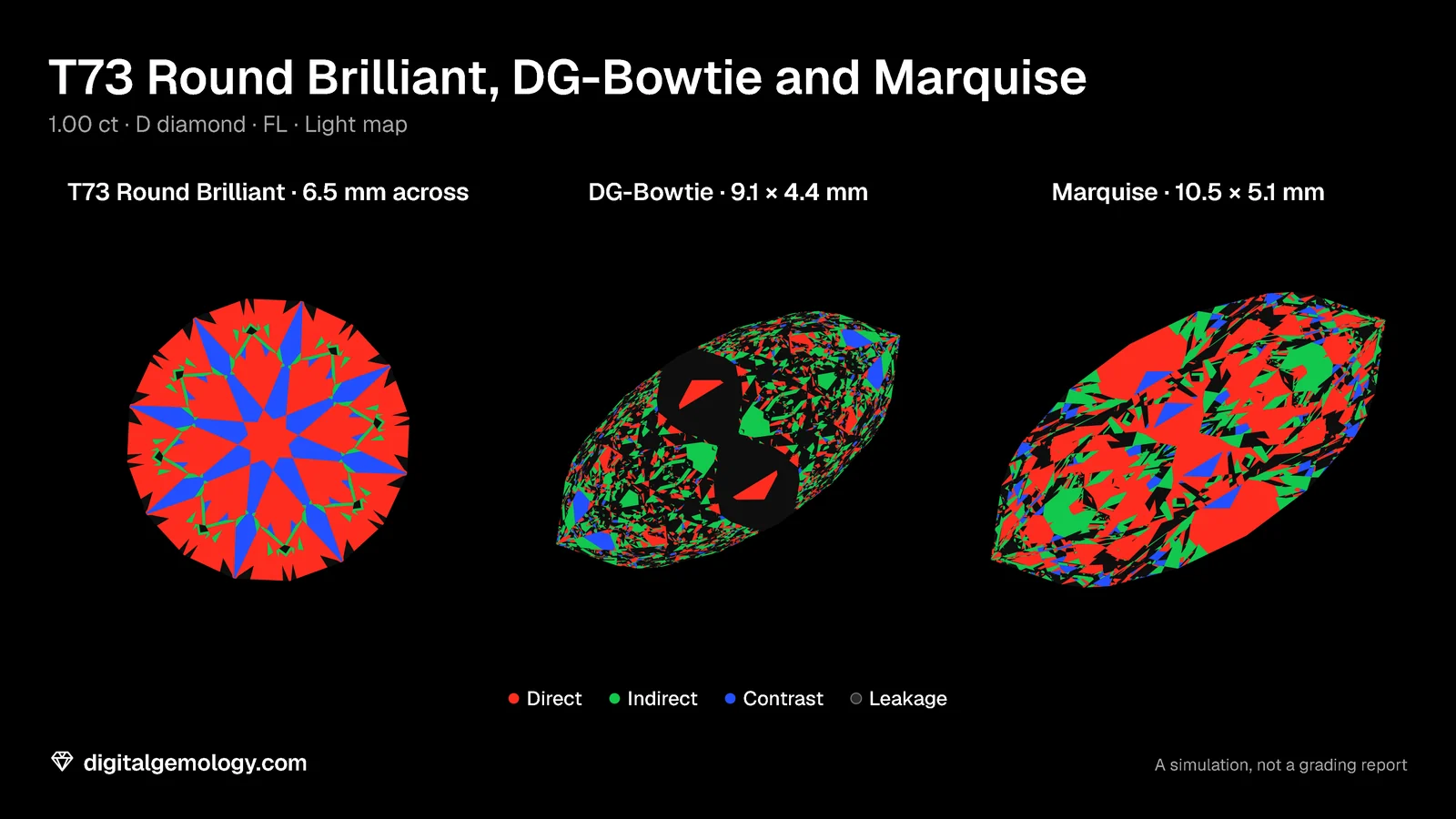
The map tells you that the bar is in the geometry. It doesn't yet tell you why the facets look where they do. And it doesn't tell you why some people never notice the bar in a shop. That leaves an honest question: is the bar in the stone, or in the room? We answer it in Bow-tie in the stone, sometimes on your finger.
Key points
- A bow-tie is a dark band across the belly of an elongated stone, pinched in the middle.
- The parts are the head or end (on a marquise, the points), the shoulders and the belly.
- It isn't an inclusion, a color or the setting: it shows in a D, Flawless stone.
- A diamond only redirects light. A facet is dark when, at the angle it was cut, it sends no light back to you.
- In the light map, DG-Bowtie's band is black: 59% leakage, against 25% for the Marquise with the same outline and facets.
Sources
- GIA 4Cs, Oval Cut Diamond Guide, 23 September 2025: the parts of an oval (head or end, shoulder, belly).
- GIA, AGS Ideal Report training module, 2024: the ASET map's four colors.
Go further: the DG-Bowtie cut page has its specifications, its light map and its scores in seven gemstones.
Try it free
- 3D Gemstone Simulator: Turn a cut in seven gemstones and set its carat, color, clarity and cut grade.
Free, in your browser, no account.
Quick quiz
What is a bow-tie?
- An inclusion across the middle of the stone
- A dark band across the belly, made by facets that send no light back
- A reflection of the prongs
Show the answer
b: A group of facets across the belly that send no light back to your eye.
In our light map, what does blue mean?
- Light that leaks out of the back
- Light from within 15° of your line of sight, where your head is
- The stone's fire
Show the answer
b: Contrast: light from 75° and above, where your own head is.
DG-Bowtie and the Marquise share an outline and 87 facets. What differs between them?
- The material
- The facet angles
- The clarity grade
Show the answer
b: Same outline, same facets in the same positions; only the angles changed.
You set DG-Bowtie to D, Flawless in the simulator. What happens to the band?
Show the answer
Nothing. It's already D, Flawless, and the band is still there: it's made by the cut, not the material.
In the simulator, what share of DG-Bowtie's face is leakage, and which color fills its band?
Show the answer
59% leakage; the band is black.
Cuts in this lesson
We sell the files of these cuts: 3D models and cutting files, with a personal-use license.