
Transcript
This 10-second clip has no sound. What you see:
Brightness & Tilt, DG-Bowtie against the Marquise tilting from −30° to +30° under the largest head shadow, 30°.
Same stone, four rooms
What a bow-tie is ends on a question: is the dark bar in the stone, or in the room?
Here's DG-Bowtie, a 1.00 ct marquise with a bow-tie, face up in four of the simulator's rooms.
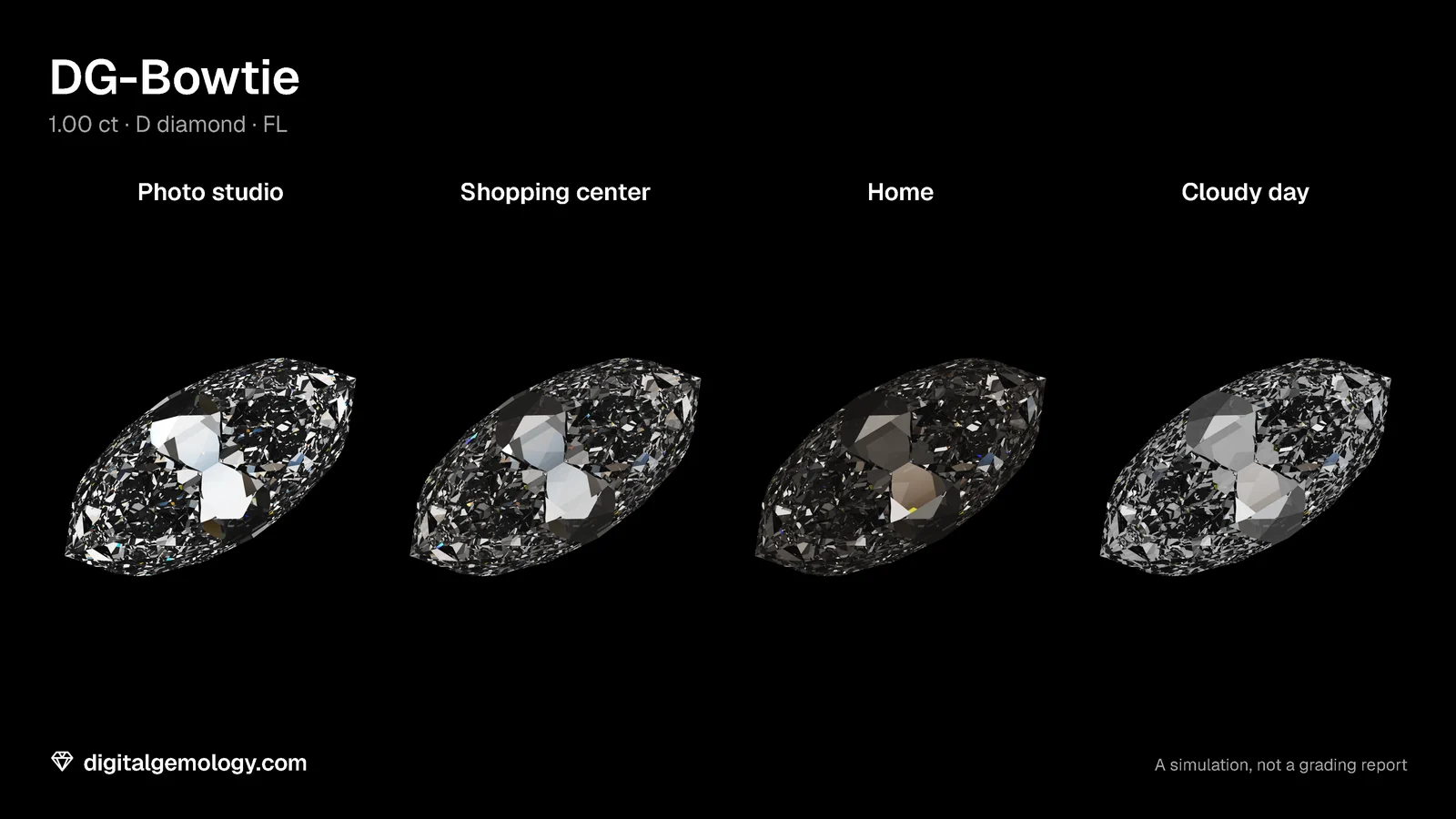
- Photo studio: the bow-tie is bright white, a flat, glassy patch in the middle of a sparkling stone.
- Shopping center: pale gray glass.
- Home: a dark bar.
- Cloudy day: pale again.
Nobody swapped the stone. In three of these rooms you'd hardly call the middle "dark" at all. This is the moment a buyer describes as "it looked perfect in the shop, and then I got it home".
The light map doesn't move
Now turn on the light map and go through the same four rooms.
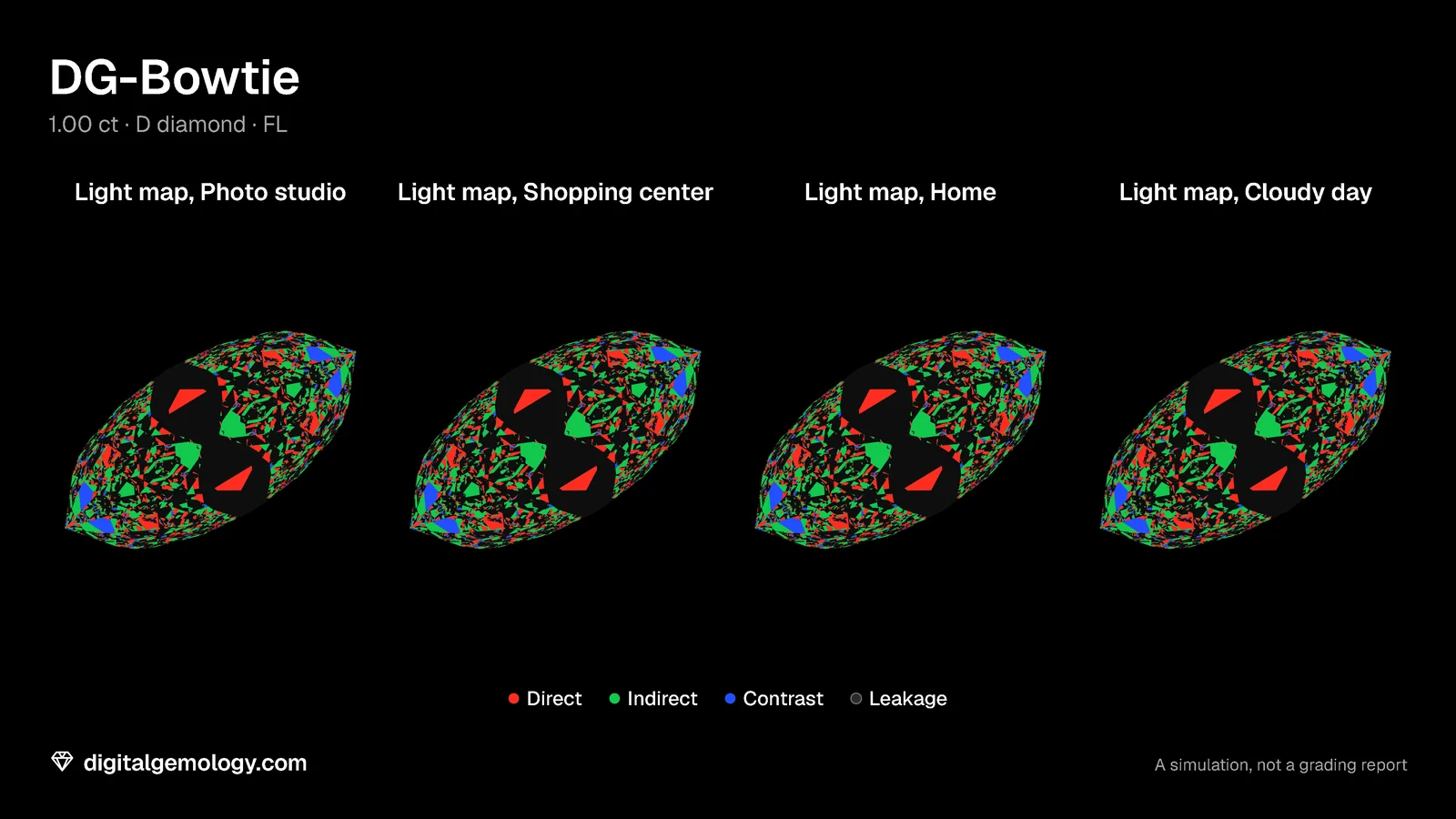
Four identical maps. The light map traces the geometry alone. No lighting scene enters it. The black band is in exactly the same place in every room, because the facets that make it are in exactly the same place.
So both halves of the answer are true at once:
The bow-tie is always in the stone. It is only sometimes on your finger.
Why the band changes color
Follow the light backward, from your eye into the stone. Across DG-Bowtie's belly, the path goes in through the table and reflects off one belly facet. Then it leaves through the opposite facet, out of the back of the stone. (That's what black means on the map: Fixing a bow-tie shows exactly why it leaves.)
So those facets don't show you a lamp above. They show you whatever is underneath the stone.
- In the Photo studio, softboxes surround the camera and a lamp lights the space below the stone. The band looks through the stone at something bright, so it shows white.
- At Home, there's a table lamp and a ceiling light, and very little light below the stone. The band shows dark.
On a hand, what's under the stone is the setting and your finger.
Where the light is, not how bright it is
The usual explanation for "it looked fine in the shop" is that the shop is brighter. Brightness alone can't do it. Double every lamp, and the bright facets double. The little light that reaches the dark ones doubles too. Their ratio stays the same, and your eye reads that ratio as contrast. So the band stays.
What changes the picture is where the light is: whether there's something bright in the directions those facets look. A shop puts many small lights around the stone, often over a pale counter. A living room has one window and a lot of dark wall, and your own head over the stone.
The Brightness & Tilt Analysis shows this in numbers. We compare DG-Bowtie with our Marquise, which has the same outline and facets but different angles. The tool's figures are shares of the available light, so a brighter dome changes nothing. What changes the figures is the shape of the light:
- ISO: light from every direction above the stone.
- COS: bright overhead, fading toward the horizon.
- SC2: a ring of light at about 45°, dark overhead.
- Head shadow: how much of the sky overhead your head blocks, from 0° to 30°.
| Diamond, face up | DG-Bowtie, head shadow 0° | DG-Bowtie, 30° | Marquise, 0° | Marquise, 30° |
|---|---|---|---|---|
| ISO | 35.3% | 23.2% | 70.6% | 47.2% |
| COS | 23.6% | 11.8% | 47.8% | 25.6% |
| SC2 | 21.0% | 18.7% | 45.4% | 35.7% |
| Leakage | 59.5% | 59.5% | 22.1% | 22.1% |
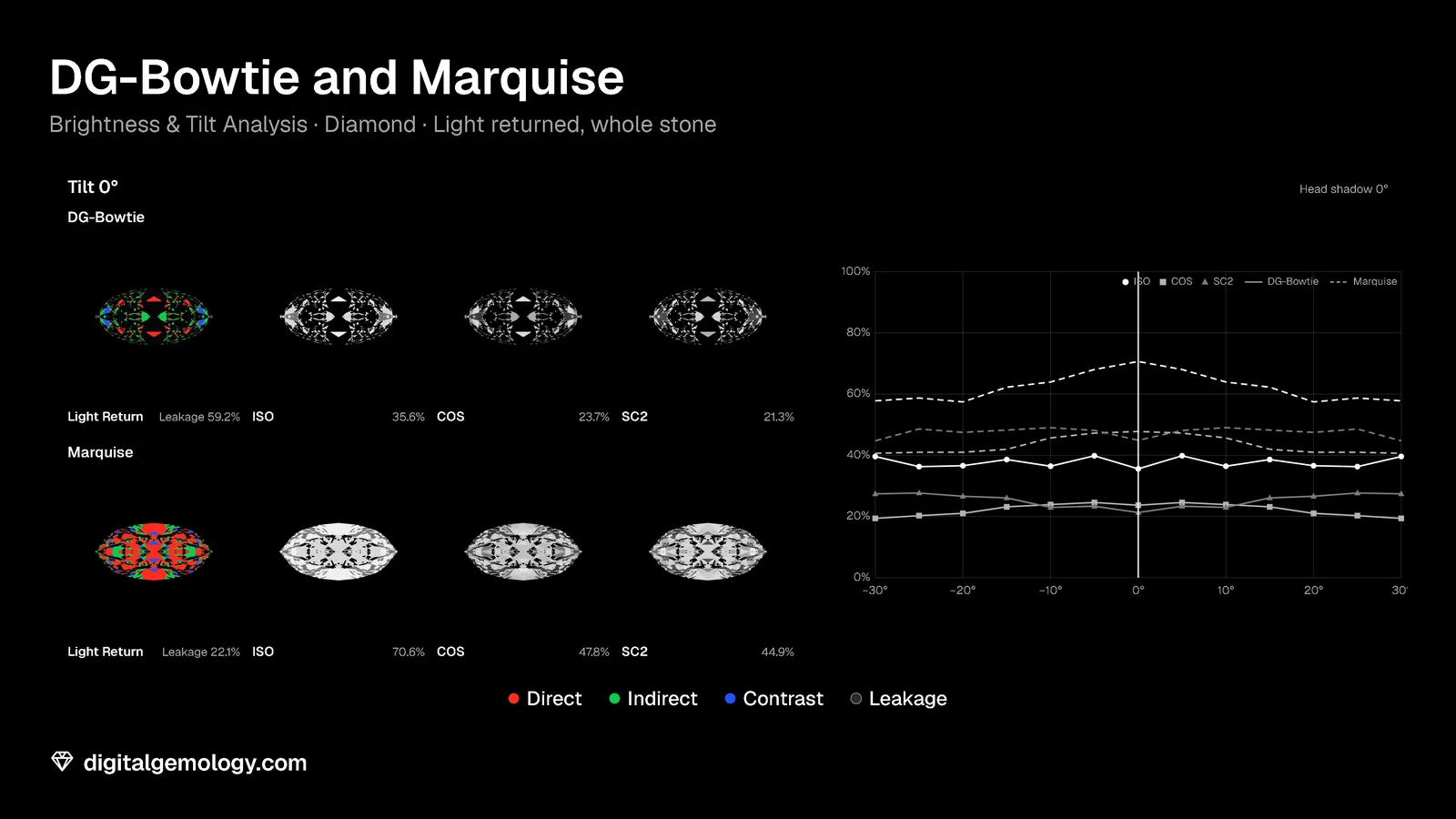
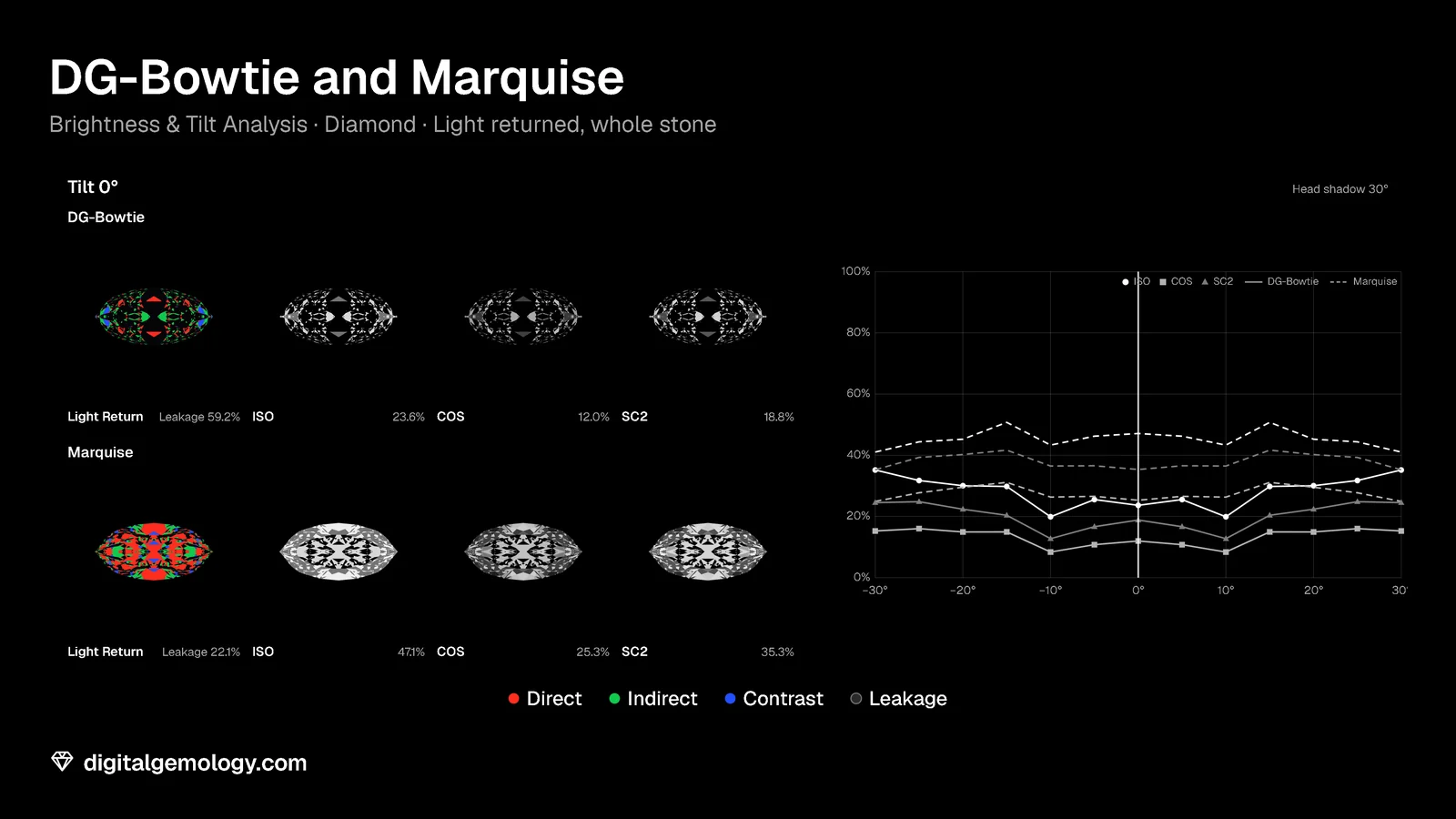
A bigger head darkens both stones in every model. Leakage doesn't move at all. Brightness & Tilt counts leakage its own way. So its figures differ a little from the simulator's Light Return: 59.5% against 59% for DG-Bowtie, and 22.1% against 25% for the Marquise. Those paths look out of the back of the stone, where no dome model puts any light. So no arrangement of light above can brighten them.
Now tip the stones, as a hand does. The video at the top of this page shows the tilt under the largest head shadow, 30°. This one shows it with no head shadow:
Compare the two videos. At every tilt, both stones are darker under the head. The leakage figure under each Light Return window is the same in both videos, frame for frame. The head bites hardest face up. Under ISO, the Marquise loses 23.5 points face up (70.6% to 47.1%), but 16.8 at a 30° tilt (57.8% to 41.0%). Face up is the view where you look straight down over the stone. It is also the view people judge a bow-tie in.
Close the door
It is easy to misread all this as "so it's only the lighting, my stone is fine". Look at the two marquises again, in the same Home light and the same view. DG-Bowtie shows the band. The Marquise doesn't.
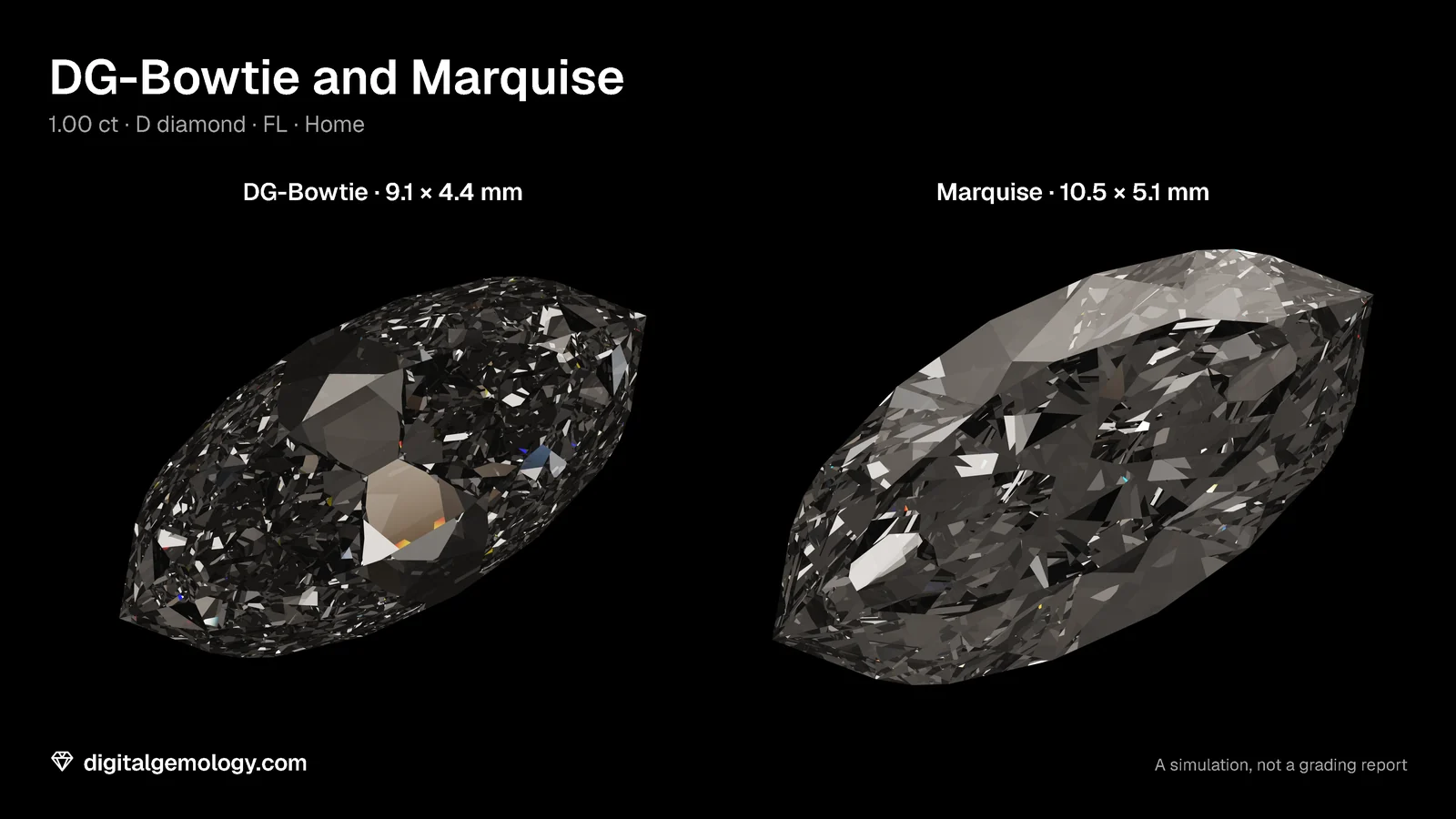
The room is the same, so the difference is the cut. The room decides whether you see the band. The cut decides whether it's there.
Shop lighting is made to show stones at their best, and it does that honestly. But it isn't a test. And it's usually the only light you see a stone in before you pay.
Try it yourself
- Open 3D Gemstone Simulator with DG-Bowtie, view Face up. Go through Photo studio, Shopping center, Home and Cloudy day.
- Turn on Light map and go through the same four. Does anything move?
- The hide-and-seek challenge: of all ten lightings, find the one where DG-Bowtie's band hides best and the one where it shows darkest.
- Open Brightness & Tilt Analysis with DG-Bowtie and compare it with the Marquise. Move Head shadow from 0° to 30°. Watch ISO, then watch Leakage. Then set the head shadow to 0° and drag Tilt from −30° to +30°. Do it again at 30°.
What the simulator and Brightness & Tilt show
The band changes from white to dark with the room. The light map doesn't change at all. The band's facets look out of the back of the stone, so they show whatever is beneath it. In Brightness & Tilt, the head shadow cuts DG-Bowtie's ISO from 35.3% to 23.2% and the Marquise's from 70.6% to 47.2%. Leakage stays at 59.5% and 22.1%. When you tilt the stones, the head still darkens both at every angle, most of all face up. Leakage still doesn't change with the head. Under the same Home light the Marquise has no band. So the room can show or hide a bow-tie, but it can't make one.
Key points
- The bow-tie is always in the stone. It is only sometimes on your finger.
- The light map reads geometry only, so it's identical in every room.
- DG-Bowtie's band looks out of the back of the stone. It shows white in the Photo studio, pale in the Shopping center and dark at Home.
- What hides or shows it is where the light is, not how bright it is. A uniformly brighter room changes nothing.
- Under the same light, the Marquise shows no band. The room decides whether you see it; the cut decides whether it's there.
Go further: How we measure: the simulator describes the ten rooms and the light map.
Try it free
- Brightness & Tilt Analysis: Face-up brightness under four standard lights, and how it holds as the stone tilts.
- 3D Gemstone Simulator: Turn a cut in seven gemstones and set its carat, color, clarity and cut grade.
Free, in your browser, no account.
Quick quiz
In the simulator, DG-Bowtie's light map under Home and under Photo studio is:
- Darker at Home
- Identical
- Brighter in the studio
Show the answer
b: The map reads geometry only.
Why does DG-Bowtie's band show white in the Photo studio?
- The studio is brighter overall
- Its facets look out of the back of the stone, and the studio lights what's underneath
- The studio removes the head shadow
Show the answer
b: They show whatever is beneath the stone, and the studio lights it.
A friend says: "My oval only shows a bow-tie in dim light, so it's the lighting, not the stone." What would you test?
- Nothing, they're right
- The same light on a different oval: if one bands and the other doesn't, the cut decides
- A brighter bulb
Show the answer
b: The room decides whether you see it; the cut decides whether it's there.
In Brightness & Tilt, what happens to leakage when you raise the head shadow from 0° to 30°?
Show the answer
Nothing: leakage paths look below the horizon, where no dome puts light (59.5% and 22.1% at every setting).
Which of the ten lightings hides DG-Bowtie's band best, and which shows it darkest?
Show the answer
Open answer: in our test, the Photo studio turns it white and Home shows it dark.
Cuts in this lesson
We sell the files of these cuts: 3D models and cutting files, with a personal-use license.
Keep exploring
- Next lesson: What causes a bow-tie? Four explanations, tested
- Try another topic · Historic diamond cuts: the history of the brilliant: Tolkowsky's 1919 ideal cut: the brilliant that was calculated
Previous lesson · The bow-tie effect: all lessons · All topics