One small star
On a GIA report, the color grade of one stone reads F*. The asterisk is a single character, smaller than the letter beside it. It means the lab detected a color treatment, and the Comments section will say what. For example, a diamond can be heated under enormous pressure (HPHT) to remove or change its color.
This page trains your eye for that kind of thing. The grade lines look simple: a letter, a few capitals, a word. But each one follows rules. Once you know them, you can tell at a glance whether a line makes sense.
How a report writes the grades
- Carat weight: to the hundredth (see the ID section of a report).
- Color grade: a letter from D (colorless) to Z (light yellow or brown). The grader compares the stone with GIA's master color diamonds. An * means the lab detected a color treatment, and Comments explains it.
- Clarity grade: from Flawless to I3, set at 10x magnification. The grade comes from the size, nature, number, position and relief of the clarity characteristics.
- Cut grade: from Excellent to Poor. It combines face-up appearance, design and craftsmanship. GIA gives it only to standard round brilliants in the D-to-Z color range. A fancy shape, or a fancy-color diamond, has no GIA cut grade, and that's not a defect.
For the meaning behind each grade, see the four Cs of diamonds. Here we care about how a report writes the grades and where they can appear.
On an IGI report: IGI also grades color D to Z against master stones, with several gemologists grading independently. It groups the letters into named bands (for example G–J, Near Colorless). IGI grades the cut of fancy shapes too, Excellent to Poor, as an option. To earn Excellent, a fancy shape has to clear four hurdles in turn:
- polish and symmetry both Very Good or better
- proportions inside IGI's published ranges for that shape
- shape-specific checks such as bow-ties and girdle ranges
- finally, a gemologist's judgment of its light return.
For rounds, IGI's top cut grade is Excellent, with an "Ideal" comment for the best (see what "ideal cut" means). Its round chart publishes one range per proportion for each grade. GIA has individual limits too, but it also grades the table, crown and pavilion angle in combination. And on an IGI round, a visible fish-eye caps the cut grade at Fair.
Try it yourself
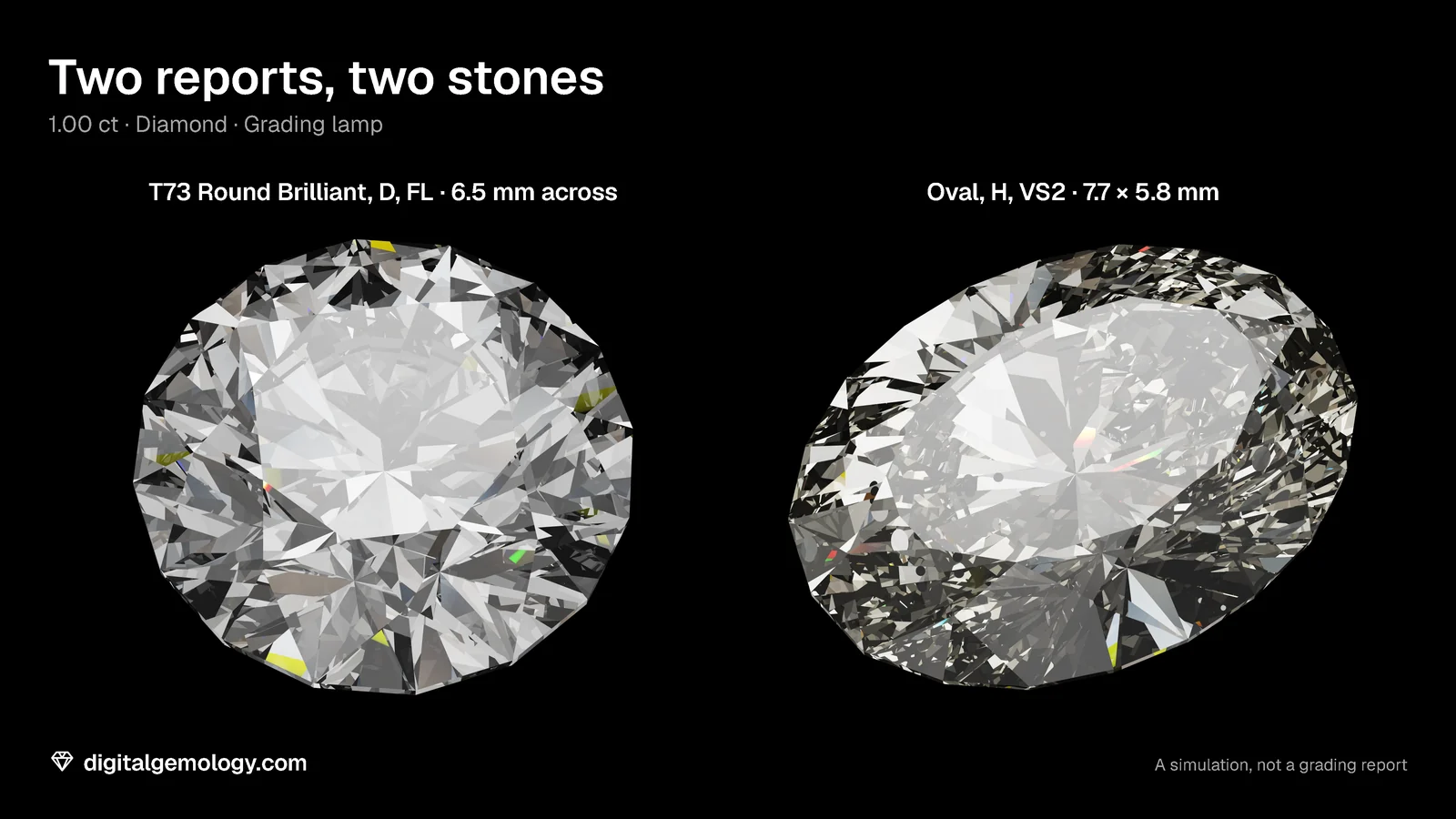
- Open 3D Gemstone Simulator. Build stone A: T73 Round Brilliant, diamond, 1.00 ct, color D, clarity FL, cut Excellent. Write its grade lines the way a GIA report would.
- Build stone B: the Oval, color H, clarity VS2. Write its lines. Which line would a GIA report leave out?
- Build stone C: the T73 again, with Color scale switched to Fancy color, Yellow, Intense. Which line would a GIA report leave out now?
- Spot the impossible. Which of these GIA grade lines can't be real?
- Round Brilliant · 1.02 ct · G · VS1 · Cut Excellent
- Oval · 1.50 ct · E · VVS2 · Cut Excellent
- Round Brilliant · 0.90 ct · Fancy Vivid Yellow · SI1 · Cut Very Good
- Round Brilliant · 2.01 ct · J* · SI2 · Cut Good
What the simulator shows
Stone A reads 1.00 ct, D, FL, Excellent: every line filled. Stone B, the oval, would get color and clarity on a GIA report, but no cut grade. GIA doesn't grade the cut of fancy shapes. Stone C, a fancy yellow, is off the D-to-Z scale. So it doesn't qualify for GIA's cut grade either, even as a round.
One simulator note: our simulator shows a Cut grade control on the oval and on the fancy yellow too. The reason: its cut grade is a fixed schedule of worse proportions that you can apply to many shapes and colors. It is not a lab grade. A GIA report wouldn't print one for either stone. The simulator is a learning tool, not a lab report.
Spot the impossible. The oval with "Cut Excellent" can't be a GIA report (it could be an IGI one). The Fancy Vivid Yellow round with a cut grade can't be GIA either: cut grades stop at D to Z. The first line is fine. The last is fine too: J* is a treated J, explained in Comments.
Key points
- Color is D to Z against master diamonds. An asterisk after the grade means a detected color treatment, explained in Comments.
- Clarity runs Flawless to I3, judged at 10x on size, nature, number, position and relief.
- GIA gives a cut grade only to standard round brilliants in the D-to-Z range. Fancy shapes and fancy colors have none.
- IGI also grades fancy-shape cut (optional; four checks to earn Excellent) and publishes one range per round proportion per grade.
- An IGI round with a visible fish-eye can't grade above Fair.
Go further: the four Cs of diamonds explains what each grade means for the stone you see.
Try it free
- 3D Gemstone Simulator: Turn a cut in seven gemstones and set its carat, color, clarity and cut grade.
- Cut Grading Tool: Grade a round brilliant from its proportions and see its light map change.
Free, in your browser, no account.
Quick quiz
Five questions on this lesson, a couple of minutes. Pick an answer and see at once if you got it, and why.
Cuts in this lesson
We sell the files of these cuts: 3D models and cutting files, with a personal-use license.
Keep exploring
- Next lesson: What "ideal cut" means on a diamond report
- Try another topic · The bow-tie effect: Is a bow-tie always there? How much is normal
Previous lesson · How to read a diamond grading report: all lessons · All topics