Transcript
A GIA report has a small side view of the stone, with numbers around it.
It is a map. Each number measures one part of the stone.
Every percentage is a share of the average diameter.
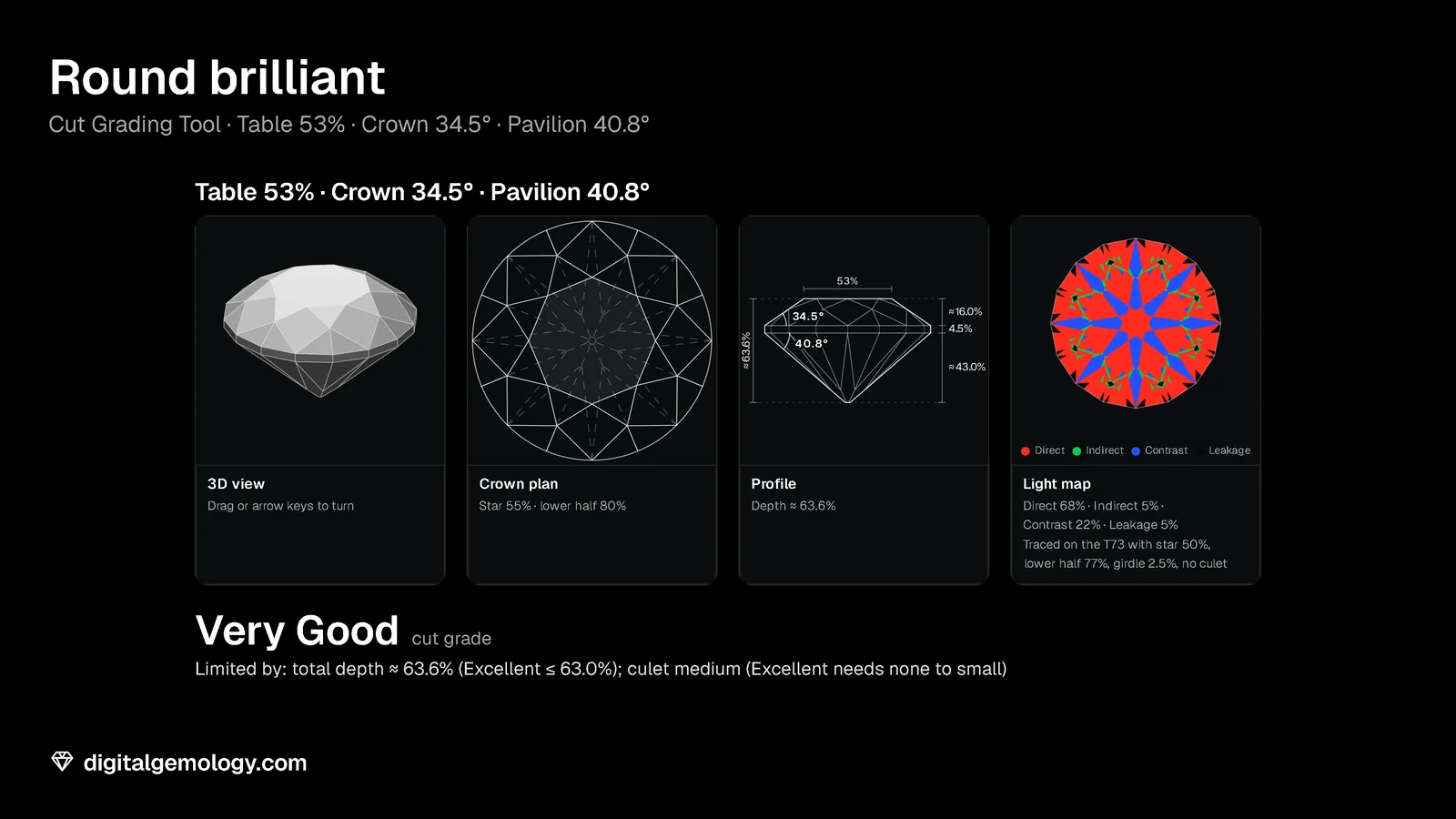
Table size: the width of the table, 53% of the diameter.
Crown angle: the slope of the crown, 34.5°.
Crown height: from the girdle up to the table, about 16.0%.
Girdle: a description from thinnest to thickest, and a percentage.
Pavilion angle: the slope of the pavilion, 40.8°.
Pavilion depth: from the girdle down to the culet, about 43.0%.
Culet size: the tip of the pavilion, as a word such as None or Medium.
Star length: the stars reach 55% of the way from the table to the girdle.
Lower half length: the lower halves reach 80% of the way to the culet.
The three heights add up to the total depth: about 63.6%.
The parts are rounded, so the sum is approximate.
An optical device measures the stone without touching it.
On an IGI report, a 3D optical scan measures the stone.
The report prints the key measurements.
In our Cut Grading Tool, this stone is Very Good, for two reasons.
The total depth, about 63.6%, is past the Excellent limit of 63.0%.
And the Medium culet caps the grade at Very Good on its own.
The one-number fix: what is the smallest change that makes it Excellent?
Thin the girdle to 3.5%. The depth falls to about 62.6%.
But the Medium culet still holds the stone at Very Good.
Make the culet Small as well, and it is Excellent.
No single change does it. The angles were never the problem.
Everything you need is in the drawing
In the corner of a GIA report sits a small side-view drawing of the stone with numbers around it. It looks like decoration. It's the opposite.
GIA designed its cut grading so that diamonds with the same rounded proportions, and the same girdle and culet descriptions, get the same grade. So the little drawing carries nearly everything the cut grade depends on. Copy its numbers into our Cut Grading Tool, and you can watch the grade appear. The tool also shows the reason a stone didn't make Excellent.
What's on the diagram
The proportion diagram is a profile of the stone, drawn to its own measured proportions. GIA's diagram shows:
- table size and total depth, as percentages of the average diameter;
- crown angle and crown height;
- pavilion angle and pavilion depth;
- star length and lower half length;
- girdle thickness, as a description from thinnest to thickest (such as "Thin to Medium") with a percentage, and whether it's faceted, polished or bruted;
- culet size, as a description (None, Very Small and so on).
An optical device measures the stone without touching it. The report gives the numbers in rounded steps.
On an IGI report: a 3D optical scan measures the stone, and the report prints the key measurements. Reports can include a graphic of the proportions too.
Rebuilding a stone
Our Cut Grading Tool takes exactly these numbers. It rounds each one to the steps a report uses:
- table 1%
- crown 0.5°
- pavilion 0.2°
- star and lower half 5%
- girdle 0.5%.
Then it reads the grade from GIA's published tables. It draws the same kind of profile, so you can compare it with the report's. It's an educational estimate, not a GIA grade.
Try it yourself
- Open Cut Grading Tool. Enter this stone, adapted from one of GIA's worked examples. Table 53%, crown 34.5°, pavilion 40.8°, star 55%, lower half 80%, girdle 4.5% (Slightly Thick), culet Medium. (Open More proportions for the last four.)
- Read the grade and the Limited by line. Compare the Profile with the numbers you entered.
- The one-number fix: what's the smallest change that makes this stone Excellent? Is one change enough?
- Find a real report or listing with its proportion diagram (any round). Rebuild it the same way, and compare the tool's grade with the report's.
What the Cut Grading Tool shows
The grade. In the tool, this stone comes out Very Good, for two reasons. The total depth, about 63.6%, is past the Excellent limit of 63.0%. And the Medium culet caps the grade at Very Good on its own. GIA's own version of this example prints a Slightly Thick to Thick girdle and a 64.2% total depth. It lists three limits: depth, girdle and culet. Our tool calculates the depth from the angles, so its figure differs.
The fix, in the tool. No single change does it. Thin the girdle to 3.5% and the tool's depth falls to about 62.6%. But the Medium culet still holds the stone at Very Good. Make the culet Small as well, and it's Excellent. (With GIA's printed 64.2%, a 1% thinner girdle would still leave the depth just over 63%.) The angles were never the problem.
Reading it the other way. Our pages on diamond anatomy and proportions show how the numbers interact, one by one. Once you know that, the diagram tells you a lot at a glance:
- A deep total depth with a thick girdle means weight below the face.
- A pavilion near the edge of its range means the light return is at stake.
Key points
- The proportion diagram is a profile of the stone drawn to its measured proportions.
- It shows table, total depth, crown angle and height, pavilion angle and depth, star and lower half lengths, girdle and culet.
- An optical device measures the proportions, and the report gives them in rounded steps.
- GIA designed its cut grade so that you can predict it from those rounded numbers and descriptions.
- Our Cut Grading Tool rebuilds a round from its diagram and estimates the grade, with the reason it stopped where it did.
Go further: every number on the diagram, one page each, and how to decode a whole stone from its numbers.
Try it free
- Cut Grading Tool: Grade a round brilliant from its proportions and see its light map change.
Free, in your browser, no account.
Quick quiz
Five questions on this lesson, a couple of minutes. Pick an answer and see at once if you got it, and why.
Keep exploring
- Next lesson: Comments, treatments and lab-grown origin on a diamond report
- Try another topic · Diamond anatomy and proportions: The parts of a diamond: crown, girdle and pavilion
Previous lesson · How to read a diamond grading report: all lessons · All topics