Two stones, one sheet of paper
Two loose diamonds of the same size can look identical. A grading report tells them apart. It records what the stone is, how it grades and how to recognize it again. A lab with no stake in the sale writes it: GIA doesn't buy or sell diamonds.
What a report is, and what it isn't
A report is a lab's record of the stone on the day the lab examined it. It records:
- whether the stone is natural or laboratory-grown
- whether it is treated
- its four Cs, its measurements and its proportions.
It is not an appraisal: it tells you what the stone is, not what it is worth.
GIA's main report types
- Diamond Grading Report: for loose natural diamonds of 0.15 carat and up. It gives the four Cs, a plotted diagram of the clarity characteristics and a drawing of the proportions. Round brilliants in the D-to-Z color range also get a cut grade.
- Diamond Dossier: for loose natural diamonds from 0.15 to 1.99 carats in the D-to-Z range. It gives the same grades and proportions, without the clarity plot. The report number is laser-inscribed on the girdle.
- Laboratory-Grown Diamond Report: GIA grades on the same principles. But the report is designed to look distinctly different from a natural report, and GIA issues it digitally.
- Identification Report: for simulants such as cubic zirconia, and for diamonds with unstable treatments such as coating or fracture filling. GIA doesn't issue a grading report for those.
GIA can also add a supplement, the AGS Ideal Report by GIA, with a separate light performance grade. What "ideal cut" means on a diamond report explains how it differs from the cut grade. GIA also issues colored stone reports. These identify the gem and any treatment, and some also give a geographic origin.
On an IGI report: IGI also reports on stones set in jewelry, "as mounting permits". Then color and clarity become a range, such as D–E, with an estimated cut grade. GIA's diamond grading reports are for loose stones only.
The five parts of a report
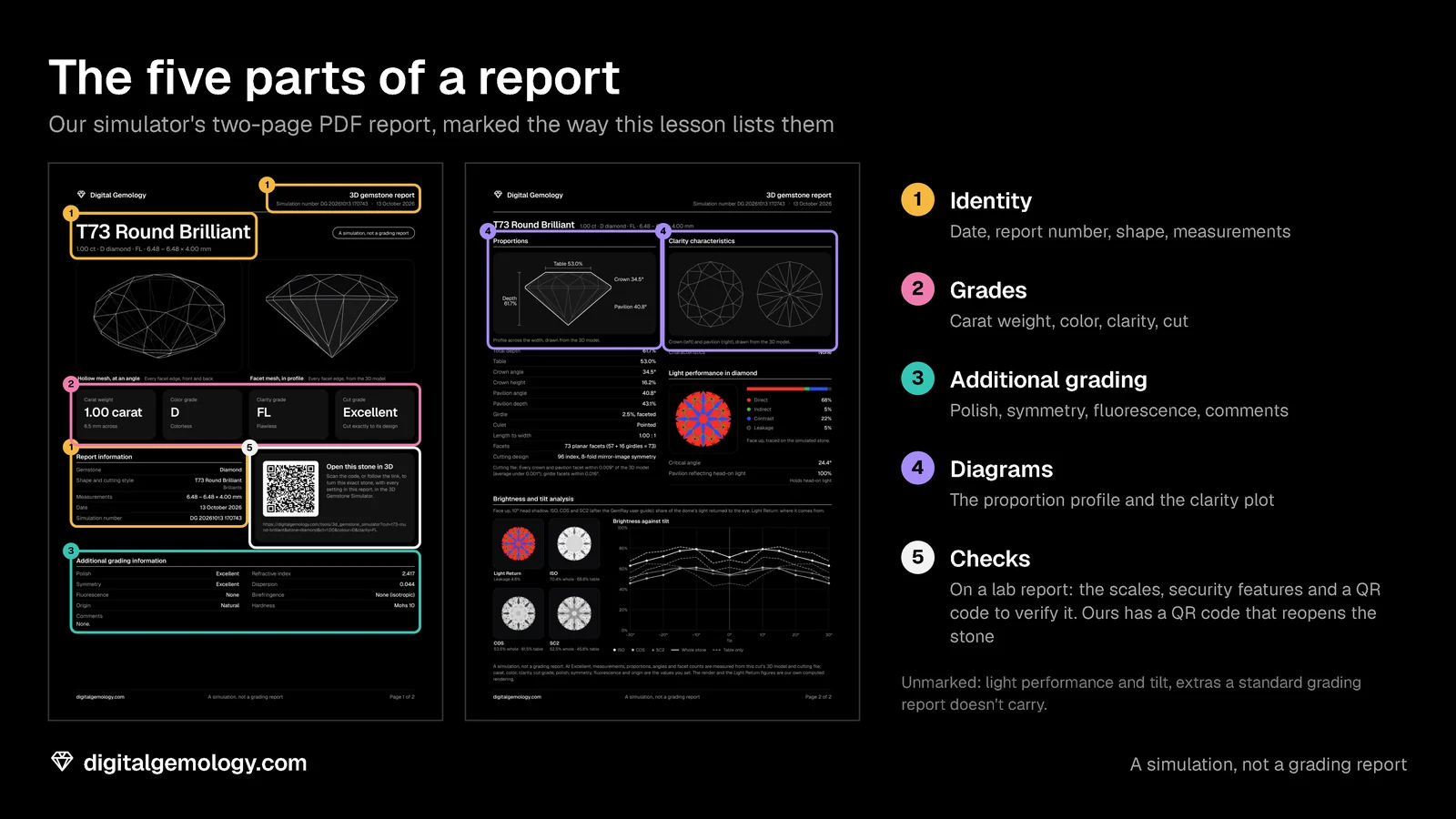
Every diamond report, from either lab, has the same five parts:
- Identity: date, report number, shape and cutting style, measurements.
- Grades: carat weight, color, clarity and, where given, cut.
- Additional grading: polish, symmetry, fluorescence, inscriptions, comments.
- Diagrams: the proportion profile and, on a full report, the clarity plot.
- Checks: the grading scales, security features and a QR code to verify the report online.
Try it yourself
Our simulator writes a report for the stone on screen, with the same layout. It is a learning tool, not a lab report.
- Open 3D Gemstone Simulator with the round brilliant in diamond.
- In the report, find the identity part: date, simulation number, shape and cutting style, measurements.
- Find the grades, then the additional grading: polish, symmetry, fluorescence.
- Scroll to the proportions and the QR code.
- Change the color grade to H. Which lines of the report change, and which stay the same?
What the simulator's report shows
Only the color line changed. Shape, measurements and proportions stayed the same, as on a real report. The identity part describes this stone and no other. The grades describe its quality.
Key points
- A grading report is an independent lab's record of what a stone is and how it grades on the day the lab examined it.
- A report is not an appraisal: it says what the stone is, not what it is worth.
- GIA's main diamond reports are the Diamond Grading Report, the Diamond Dossier, the Laboratory-Grown Diamond Report and the Identification Report.
- Every diamond report has five parts: identity, grades, additional grading, diagrams and checks.
Go further: the ID section of a report: how to make sure a report belongs to the stone in front of you.
Try it free
- 3D Gemstone Simulator: Turn a cut in seven gemstones and set its carat, color, clarity and cut grade.
Free, in your browser, no account.
Quick quiz
Five questions on this lesson, a couple of minutes. Pick an answer and see at once if you got it, and why.
Keep exploring
- Next lesson: The ID section of a diamond report: number, shape and measurements
- Try another topic · Diamond anatomy and proportions: Crown angle and crown height in a round diamond
How to read a diamond grading report: all lessons · All topics