The small print that vetoes the cut
Below the big four grades, a report has three short lines: polish, symmetry, fluorescence. They look like footnotes. They aren't.
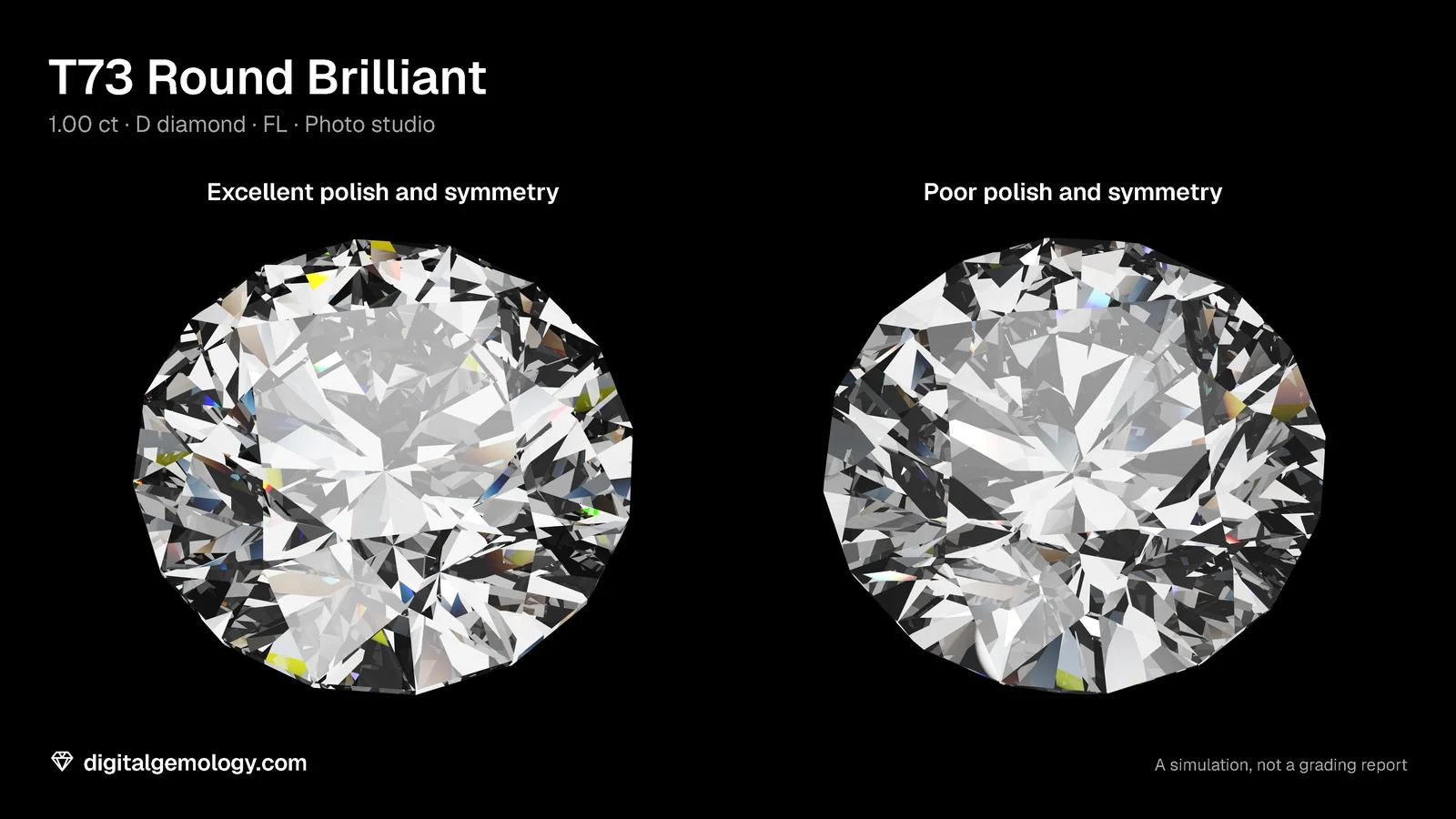
Take a round with every proportion in GIA's Excellent range. Give it Good polish, and on GIA's system it can't be Excellent any more: the best it can get is Very Good. And symmetry is precise enough to measure in tenths of a degree. Try it in our Hearts & Arrows Scope. Tilt the T73's pavilion mains by at most a tenth of a degree, each a different amount. The symmetry of its hearts drops from 100% to 85%.
Polish: the surface
Polish describes how smooth the surface of the facets is, from Excellent to Poor. The grader looks at the stone at 10x for the marks that polishing or wear leaves:
- tiny pits and nicks
- fine polish lines
- scratches
- burn marks from overheating
- rough patches.
At the low end, the stone's luster suffers even to the unaided eye.
Symmetry: the geometry
Symmetry, also Excellent to Poor, is about geometry. Is the outline true? Does every facet have the right shape, sit in the right place and line up with its neighbors? GIA sorts the faults into two kinds:
- proportion faults, such as an off-center table or culet, an out-of-round outline, a wavy girdle, or a table not parallel to the girdle;
- facet faults, such as extra or missing facets, misshapen facets, facets that don't meet in a point, or crown and pavilion facets out of line with each other.
Why they matter: the cap
On a GIA report, polish and symmetry cap the cut grade of a round:
| Polish and symmetry | Best possible cut grade |
|---|---|
| Excellent or Very Good | Excellent |
| Good | Very Good |
| Fair | Good |
| Poor | Poor |
GIA found that one grade of difference didn't noticeably change how observers rated a stone. That is why Very Good finish still allows Excellent.
On an IGI report: IGI lists polish and symmetry for every shape and color. Low polish or symmetry can pull a round's cut grade down too. Its "Ideal" comment needs at least Very Good for both.
Fluorescence: the glow
Fluorescence is a glow. Shine ultraviolet light on some diamonds and they light up, usually blue, for as long as the UV is on. A GIA report gives its strength and color under long-wave UV. Two things to know:
- "None" doesn't mean zero. It covers everything from no visible reaction up to very faint.
- It isn't a grade. It's there to help identify the stone, not to rank it.
GIA reports that about 25 to 35% of the diamonds it sees fluoresce, and more than 95% of them glow blue. For most stones, GIA says, it makes no noticeable difference to their looks.
On an IGI report: IGI also records strength and color when fluorescence is present. It puts the share of fluorescent diamonds at around 35%.
Try it yourself
- Open 3D Gemstone Simulator, T73 in diamond, Photo studio. In the report, under Additional grading information, step Polish from Excellent to Poor, then Symmetry. Watch the stone each time.
- Set the lighting to UV lamp and step Fluorescence from None to Very strong. Then go back to Photo studio.
- Open Cut Grading Tool. Under More proportions, set Polish to Good, then Fair. Read the grade and the Limited by line.
- Break the hearts. Open Hearts & Arrows Scope with the T73. Move Crown twist, then Main angles, a little at a time. How small an error drops the symmetry figure below 95%?
What the tools show
In the simulator, poor polish makes the stone look hazy and flat. It lowers contrast and color, because a rough surface scatters light. Poor symmetry tilts each crown and pavilion facet by up to 2°, and the pattern loses its order. Fluorescence glows blue under the UV lamp and changes nothing in daylight. The simulator is a learning tool, not a lab report: its polish and symmetry are simple models.
In the Cut Grading Tool, Good polish makes the T73 Very Good and Fair polish makes it Good. The tool spells out the reason.
In the Scope, the symmetry figure falls fast. Main angles off by up to a tenth of a degree give 90% face up and 85% face down. A crown twisted by one degree gives 92% and 88%. That's how fine the symmetry a grader judges really is.
Key points
- Polish is the smoothness of the surface. Symmetry is the exactness of the outline and the facets. Both run Excellent to Poor.
- On a GIA round, Good polish or symmetry caps the cut grade at Very Good, Fair at Good, Poor at Poor.
- IGI lists polish and symmetry for every shape and color. Low finish can pull its cut grade down too.
- Fluorescence is the strength and color of the glow under long-wave UV. "None" means anything from no reaction to very faint.
- Fluorescence identifies a stone. It isn't part of the color or clarity grade.
Go further: fluorescence under the UV lamp, and the cut grade's other limits.
Try it free
- 3D Gemstone Simulator: Turn a cut in seven gemstones and set its carat, color, clarity and cut grade.
- Hearts & Arrows Scope: See the arrows face up and the hearts face down as you change the cut.
- Cut Grading Tool: Grade a round brilliant from its proportions and see its light map change.
Free, in your browser, no account.
Quick quiz
Five questions on this lesson, a couple of minutes. Pick an answer and see at once if you got it, and why.
Cuts in this lesson
We sell the files of these cuts: 3D models and cutting files, with a personal-use license.
Keep exploring
- Next lesson: The clarity plot: how to read the inclusion map on a report
- Try another topic · Diamond anatomy and proportions: Star length and lower half length in a round brilliant
Previous lesson · How to read a diamond grading report: all lessons · All topics