The dark eye in the middle
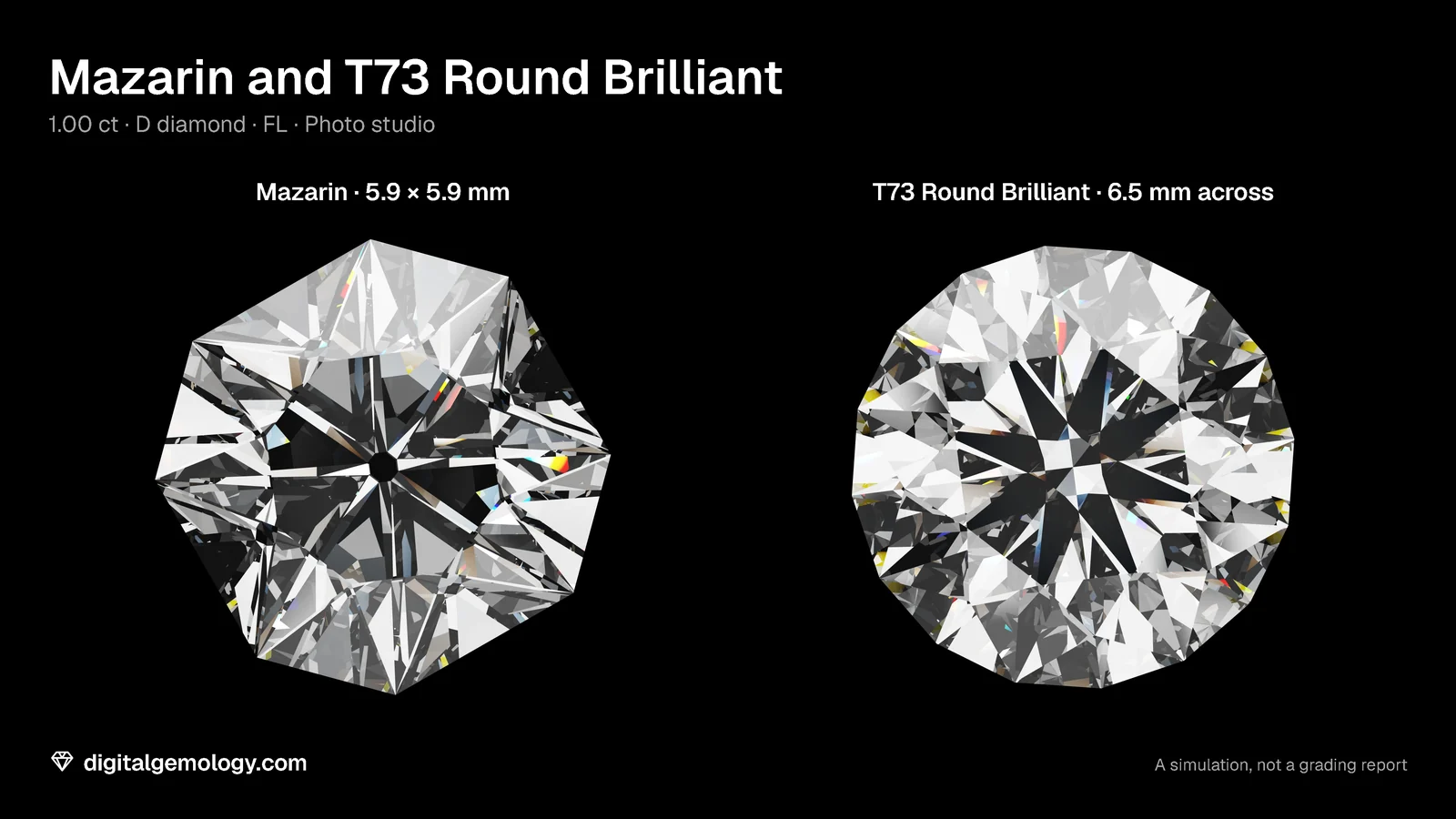
Look at a Mazarin face up. This mid-1600s cut was the first to be called a brilliant. Right in the center is a small dark spot, like the pupil of an eye. It's the bottom of the stone: a wide, open culet, seen straight through the table.
Now look at our T73. No spot. Its pavilion mains meet in a point.
In 1919, Tolkowsky kept his culet tiny. In his view it had one job only: to stop the stone from ending in a needle point. Today our Cut Grading Tool reads GIA's tables and shows how much that point can matter. Give an otherwise Excellent T73 an extremely large culet, and it's graded Poor. The smallest facet on the stone can sink the grade on its own.
What the culet is
The culet is a tiny facet polished across the bottom point of the pavilion, parallel to the table. Its job is protection: a sharp point can chip, especially on a loose stone.
A report describes it in eight sizes:
None · Very Small · Small · Medium · Slightly Large · Large · Very Large · Extremely Large
"None" means that there's no culet facet. The eight mains meet in a point, which is often called pointed. And the little bottom facet must be parallel to the table. If it isn't, it is not a culet at all: the lab treats it as an extra facet and still writes None.
Like the other proportions, the size is a percentage of the average diameter. GIA's chart gives typical values for an octagonal culet: about 1.5% for Small, 3% for Medium, 7% for Large and 15% for Extremely Large. The smallest sizes are too fine to measure reliably. So the grader judges them by eye, face up through the table at 10x.
Why size matters face up
From above, you look straight down through the table at the culet. A tiny culet disappears in the pattern. A large one shows as a spot in the very center, light or dark, as a result of what it reflects. It breaks up the pattern exactly where your eye goes first. That's why GIA counts culet size as part of the pattern of a stone.
Try it yourself
- Open 3D Gemstone Simulator. Load the Mazarin, set View to face up and look at the center. Then load the T73 Round Brilliant.
- On the T73, turn on Light map and set the Cut grade to Poor. This gives it a culet 3.5% of the width. Look at the center of the map.
- Open Cut Grading Tool. Under More proportions, move Culet from None to Extremely large. Watch the Crown plan, the Profile and the grade.
- Find the line: which culet sizes still allow Excellent?
What the simulator and the Cut Grading Tool show
The spot. Face up, the Mazarin's open culet shows as a dark eye in the center. On the light map it's a black dot: light that goes straight out through the bottom. The Poor T73, with a 3.5% culet, shows the same black dot in the middle of its map. The Excellent T73, with a point, has none.
The grade. None, Very Small and Small allow Excellent. Medium limits the T73 to Very Good. Slightly Large and Large limit it to Good, Very Large to Fair, and Extremely Large to Poor. In the tool's crown plan, the culet appears through the table as a small octagon, and the profile becomes flat at the bottom.
Why so strict? A culet does nothing for light. It only protects the point. So any size larger than protection needs is pure cost: a spot in the pattern, and nothing gained. One honest note: the tool traces its light map on the T73 with no culet, so use the simulator's map to see the spot.
Key points
- The culet is a small facet across the point of the pavilion, parallel to the table. It is there to prevent chipping.
- Reports describe it in eight sizes, from None (pointed) to Extremely Large, as a share of the average diameter.
- Face up, through the table, a large culet shows as a spot in the center of the pattern.
- The Mazarin of the 1600s had a wide, open culet. Tolkowsky, in 1919, kept it as small as possible.
- In the Cut Grading Tool, Small or less allows Excellent. Extremely Large drops the T73 to Poor.
Go further: the Mazarin cut page describes its open culet. The T73 page shows a pointed one.
Try it free
- Cut Grading Tool: Grade a round brilliant from its proportions and see its light map change.
- 3D Gemstone Simulator: Turn a cut in seven gemstones and set its carat, color, clarity and cut grade.
Free, in your browser, no account.
Quick quiz
Five questions on this lesson, a couple of minutes. Pick an answer and see at once if you got it, and why.
Cuts in this lesson
We sell the files of these cuts: 3D models and cutting files, with a personal-use license.

Keep exploring
- Next lesson: How to read diamond proportions: decode a stone from its numbers
- Try another topic · Historic diamond cuts: the history of the brilliant: The Mazarin cut: the first brilliant
Previous lesson · Diamond anatomy and proportions: all lessons · All topics